ComfyUI Workflows Made Easy: Skip the Setup and Start Creating
%20(2).avif)
%20transparent.avif)

ComfyUI Workflows — No Setup Required, Easily Install and Run
If you’ve explored AI image and video generation, you’ve probably heard of ComfyUI — the ultra-flexible, node-based workflow system that gives creators deep control over their AI outputs.
It’s powerful. It’s customizable. But it’s not exactly plug-and-play.
Installing ComfyUI workflows often means:
- Hunting down the right model files on Hugging Face or GitHub
- Troubleshooting broken ComfyUI custom nodes
- Downloading and installing LoRA files
- Adjusting system and security settings
- Piecing it all together inside a complex, canvas-style node editor
For creators who just want to start generating images and videos, this can be frustrating and time-consuming.
The Problem with Manual ComfyUI Setup
ComfyUI gives you incredible flexibility, but that flexibility comes at a cost — hours of setup and ongoing maintenance.
Even experienced users run into issues:
- Models that don’t load correctly
- Missing dependencies
- Workflows breaking after updates
- Confusing node layouts that make troubleshooting difficult
If you’ve ever asked yourself, “Why isn’t this node working?”, you know the pain.
An Easier Way: CosyFlows in Promptus
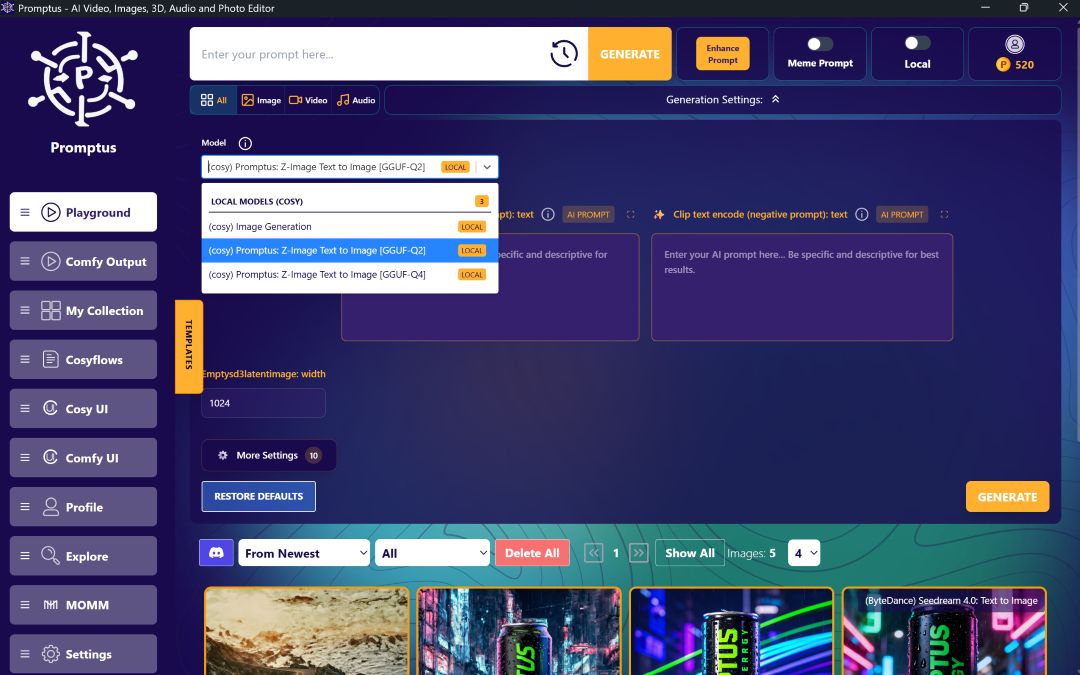
CosyFlows takes the most popular ComfyUI workflows — like Flux Context, WAN 2.2, Lipsync, and hundreds more — and makes them one-click simple.
Here’s how it works:
- Pick Your Workflow – Select from our library of pre-tested ComfyUI workflows.
- Promptus Loads Everything for You – Models, nodes, inputs… all set up instantly.
- Type Your Prompt & Generate – Get your AI images or videos in seconds.
Why Creators Love CosyFlows
- ✅ No Downloads – Everything is preloaded.
- ✅ No Dependency Errors – Workflows just work.
- ✅ Fully Secure – Safe, reliable environment.
- ✅ Windows & Web Access – Use it how you want.
Instead of spending hours configuring ComfyUI, you can start creating in minutes.
ComfyUI Workflows You Can Run Instantly
Some of the most popular CosyFlows include:
- Flux Context – High-quality image generation with contextual prompts
- WAN 2.2 – Advanced diffusion-based AI workflows
- Lipsync – Sync video characters to custom audio
- Custom Animation Pipelines – Build sequences without manual node wiring
📜 Browse the full list of CosyFlows here: https://www.promptus.ai/comfyui-workflows
How to Get CosyFlows
CosyFlows is part of the Promptus Playground, available as:
💻 Windows App – Full desktop experience
🌐 Web Access – Use directly in your browser
One-time purchase: $49 — no recurring fees.
Final Thoughts
If you love the power of ComfyUI but hate the set-up process, CosyFlows is your shortcut to creativity.
Stop wrestling with nodes, dependencies, and downloads — start creating instantly.
👉 Get CosyFlows for $49 and unlock one-click ComfyUI workflows today: promptus.ai